Capturing images (pictures, screen shots)
The ClubHouse: Big Brother : USA 2001:
All Things Technical for BB 2001 (computer stuff):
Capturing images (pictures, screen shots)
| Ryn | Monday, July 09, 2001 - 11:19 pm 
there have been several issues on how to capture pictures from the live feeds. I have a method but its a bit too late for me to go in to it.
If anyone wishes to describe how they do it please feel free to post it here 
Images, not video (avi's, etc) - I will start another thread on that topic. |
| Ewing2001 | Monday, July 09, 2001 - 11:21 pm
Use
a) ANALOG X
http://www.analogx.com
saved whole screen as BMP, my favourite
or
b) HYPERSNAP
http://www.hyperionics.com/
allows to save as gif, jogs immediately |
| Ryn | Monday, July 09, 2001 - 11:32 pm
not to go into deatail....
I have used (and paid for) hypersnap, love it.
A simple method for windows users that works in most instances (you may need to turn off VId Optimization in real player) is hitting the "print Screen" button. that copies an image of the screen to the clipboard. You can thn open any image manipulations program (such as Paintbrush) and "PASTE" the clipboard as a new image. then edit away.
another fyi, for putposes of screen display only, jpg's are MUCH smaller than bmps (which are better if you are goign to print the pictures).
thats it for now. I know some people won;t understand all of that and those that do probably already knew how to do it. |
| Webgirl | Tuesday, July 10, 2001 - 04:19 am
I have several graphic programs one of which is CorelDraw. If you have this, there is a graphics utility included with the program called Capture and it will capture the active window instead of the entire screen, which uses up too much memory. |
| Ewing2001 | Tuesday, July 10, 2001 - 05:29 am
Webgirl, i'm sure that the video screen can't be captured only by everyone. You need maybe much RAM for that and it has to do with everyone's capture card and their driver settings.
You have to save the whole screen with programs like AnalogX or Hypersnap, otherwise you "screenshot" a black part of the player and sure it uses way too much "memory"=you mean space of bytes.
But later you can cut and crop the part you wanna use with Paintshop or other smaller graphic programs(less working memory= now we can talk of Memory!) instead of Photoshop or Corel Draw. Then you save is as 256k colors and a gif or jpegs(more space) and maybe reduce it later once again in photoshop (for web only, this is included since version 5.5)
(LOL, i didn't know that Corel Draw are still around. Didn't Photoshop buy them and put them as a plug-in into their filters?? Hehe, i think that was Harvard Graphics)
Sorry to clear that up. |
| Ryn | Tuesday, July 10, 2001 - 08:12 am
Actually - hypersnap allows you to capture just a region of a screen, or the active window, or the whole screen, your choice. |
| Judy | Tuesday, July 10, 2001 - 10:28 am
I moved this to the "video capture thread"
oops
Judy |
| Ryn | Thursday, July 19, 2001 - 02:06 pm
bump.. someone e-mailed me and asked how to do this... |
| Danyboy | Thursday, July 19, 2001 - 03:04 pm
That must be me Ryn is talking about. Sorry.
I already have several capture screen applications but each time I try to use them, the area where the live feed should appear (but not the buttons area allowing to change feed) appears all in black.
I see up here Ryn taking about "(you may need to turn off VId Optimization in real player)", I have look all over RP and I can't find what you are talking about. Can you be more specific?
Thanks |
| Danyboy | Thursday, July 19, 2001 - 03:09 pm
Forgot the preceding message. I found what I was looking for.
Thanks anyway |
| Spygirl | Thursday, July 19, 2001 - 04:10 pm
ahhh--wait! i didn't find it  |
| Bb2001nyfan | Friday, July 20, 2001 - 02:16 pm
I've tried AnalogX and print screen to no avail. BBlive.exe does work for me though. |
| Ben | Wednesday, July 25, 2001 - 03:56 pm
hi I tried to use the capture software from analogx but failed to capture the image... the screen went black when I saw the bmp file. What's wrong? Thanks |
| Caffeinebuzz | Thursday, July 26, 2001 - 09:25 am
Ben-
I had that same problem too.
Someone here posted a fix (I think it was Ryn).
Try this...
In your RealPlayer go to preferences, click on the Performance tab and uncheck "Use optimized video display".
Good Luck! |
| Spygirl | Thursday, July 26, 2001 - 03:25 pm
I've read all the instructions and I've visited those two websites. Please forgive me, but I still don't get how I can do this. AT YOUR CONVENIENCE (whoever can), please walk me through EXACTLY what I need to do (i.e. download, purchase, click this, check that, etc). I'm in no hurry, and don't expect a reply RIGHT this minute  . Thank you in advance! |
| Ryn | Saturday, August 11, 2001 - 08:12 am
Ok, here is a step by step on getting the images.....
this is for PC users only, sorry mac folks. Then again I suspect it might be easier for you anyways!! |
| Ryn | Saturday, August 11, 2001 - 08:13 am
Here is how to set Real Player (to eliminate the Black Box problem):
1st, open real player and choose "View"
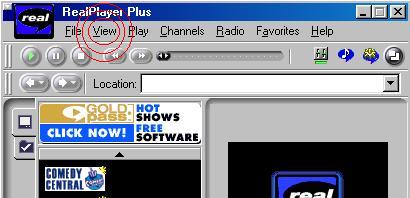 |
| Ryn | Saturday, August 11, 2001 - 08:15 am
Now, choose the "Preferences" option from the drop-down menu:
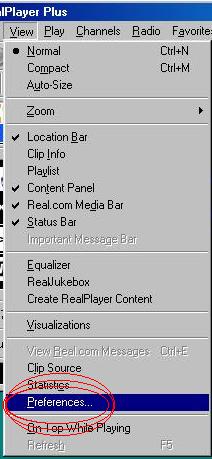 |
| Ryn | Saturday, August 11, 2001 - 08:17 am
A box will open, select the "Perfomance" tab and then make sure the "Use Optimized Video Display" is UNCHECKED.
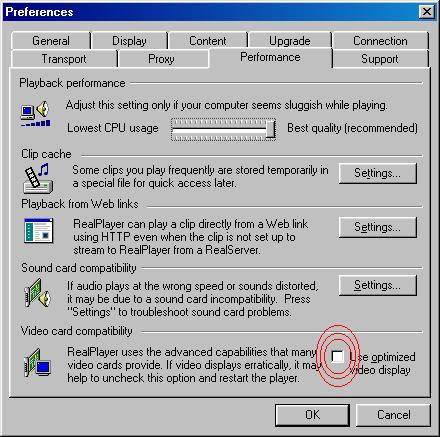 |
| Ryn | Saturday, August 11, 2001 - 08:21 am
Click OK and re-start Real Player.
Now with SOME computers (not all), if you hit the Print Screen key, the computer will capture an image of the screen.
you can THEN open up Microsoft Paintbrush, and choose Edit, Paste.
If the "paste" option is not available then you will have to look at another option (one of the above programs). If it is you will see a screen capture of your entire desktop. You can then cut the image and paste it to a new image.
If this is sounding too confusing I'm sorry, but there is only so much I can do to explain it. |
|